

Generate a crypto address
The most common scenario is to automatically generate a crypto address for every new customer. To do that, you can use /v2/addresses/take API endpoint. You need to include the customer’sforeign_id, which can be any data about the user or the transaction you need to process the deposit on your side.
To boost conversion rates from cryptocurrency payments, design a user-friendly payment form. For tips on how to improve the form, see Design a crypto payment form. For XRP, you also need to display the customer’s personal tag alongside their address. XRP deposits sent without a tag may be lost.
You can create multiple addresses for the same customer.
Receive deposits with exchange
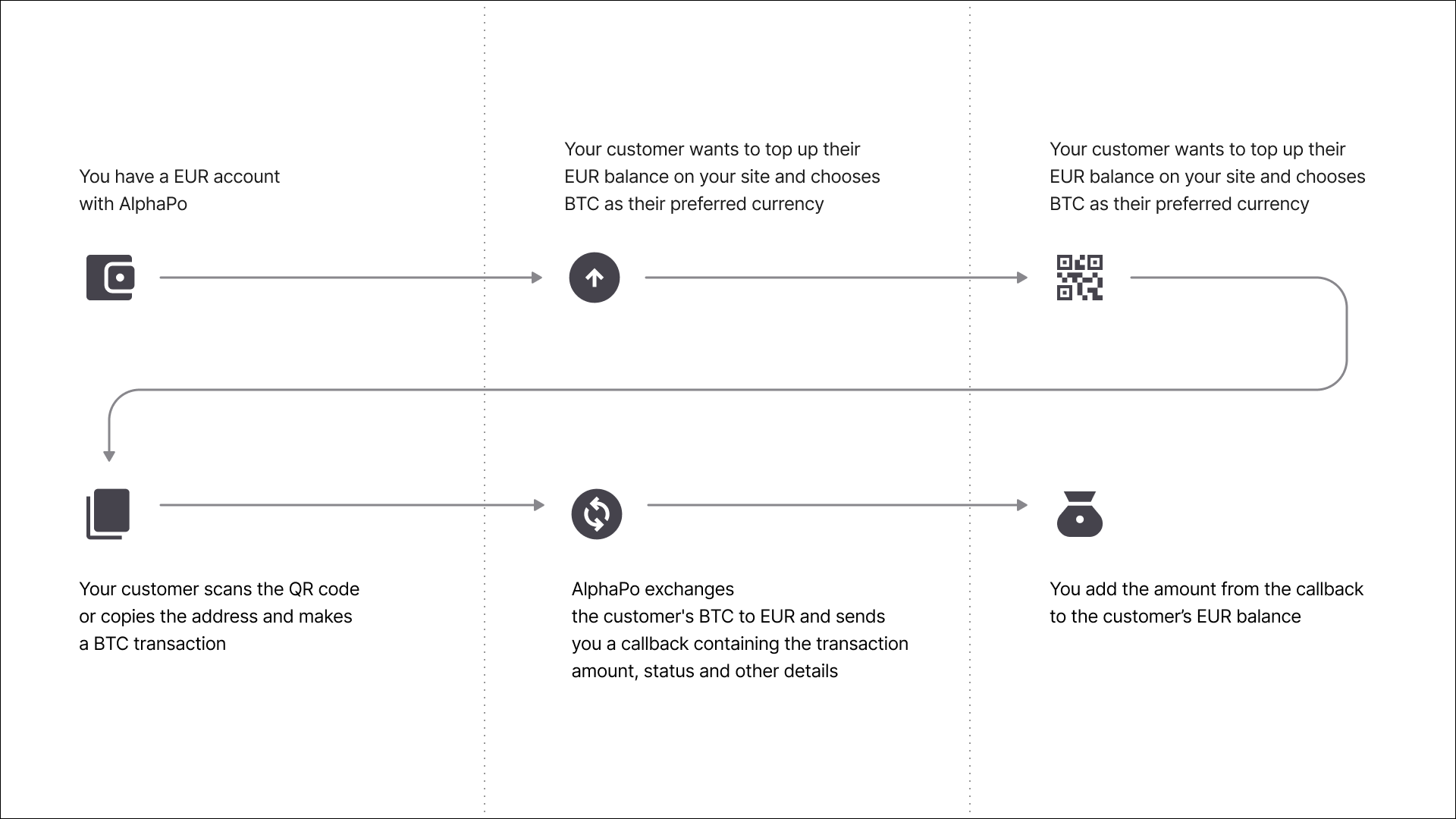
For deposits with exchange, all received deposits will be automatically converted to the currency you specified. For example, a customer can top up their EUR balance on your site with BTC, which will be automatically converted to EUR by AlphaPo. To specify which currency you want the deposit to be converted to, include theconvert_to parameter when making a request to /v2/addresses/take.
Once your customer makes a deposit, you will receive a callback with all the relevant data, including the amount of the deposit and the amount of fees charged by AlphaPo. For more details, see Callbacks.
For USDC and USDG tokens, the exchange rate is always 1:1. For example, 1 USDC on ERC-20 is always equivalent to 1 USDC on SOL.
Receive deposits without exchange
For deposits without exchange, you will receive the currency the customer deposited. Once your customer makes a deposit, you will receive a callback with all the relevant data, including the amount of the deposit and the amount of fees charged by AlphaPo. For more details, see Callbacks.Handle deposits sent in the wrong currency, on the wrong network or without a tag
Some deposits may not show on your balance automatically or might be lost. Most common cases include:- Deposits sent in the wrong currency on the same network.
- Deposits sent in an unsupported currencies on the same network.
- XRP and TON deposits sent without a tag or with the wrong tag.
- Deposits sent on the wrong network.
Deposits that are on the same network
Deposits in these currencies will be credited to your balance automatically, but you will not receive a callback. For deposit addresses with exchange, deposits in the wrong currency will also not be exchanged.| Network | Currencies that share this network |
|---|---|
| Ethereum, Polygon and BNB Smart Chain (EVM-compatible chains) | ETH, POL, USDC (ERC‐20), USDC (POL), USDT (ERC‐20), USDT (POL), BXBT (ERC‐20), DAI (ERC‐20), EURS (ERC‐20), XED (ERC‐20), BNB‐BSC, SNACK (BEP‐20), USDT (BEP‐20) |
| Solana | SOL, USDC (SOL) |
| Tron | TRX, USDT (TRX) |
| Network | Currencies that share this network |
|---|---|
| TON | TON, USDT (TON) |
Deposits within the same network
All deposits sent to your EVM-compatible addresses (starting with
0x) will be bridged to the correct chain and credited to your balance automatically. However, you will not receive a callback and they will not be automatically exchanged. This applies to Ethereum and Binance Smart Chain.Deposits in unsupported currencies
You will not see deposits in unsupported currencies in your merchant dashboard. For example, this applies to all unsupported ERC-20 tokens sent to your Ethereum address, unsupported SPL tokens sent to your Solana address and other similar cases. The deposits will be credited to the address on the blockchain, but you will not see them on your balance in your AlphaPo merchant dashboard. To see if your deposit can be recovered, contact our support team at [email protected] or using the widget in your merchant dashboard.XRP or TON deposits sent without a tag or with the wrong tag
XRP or TON deposits sent without a tag or with the wrong tag will not be credited to you automatically. To see if your XRP or TON deposit can be recovered, contact our support team at [email protected] or using the widget in your merchant dashboard.Deposits across different networks
If your customer sent a deposit on the wrong network (for example, BTC to an Ethereum address), you will not be able to access it. The only exceptions are Ethereum and Binance Smart Chain. As these are EVM-compatible networks, deposits can be seamlessly bridged between them. To prevent this in future, always clearly specify the currency name and network when you share the address with your customers. You should also notify customers that deposits sent to the wrong address cannot be recovered, so they should always double-check the currency and the network before they send a transaction. To see if your deposit can be recovered, contact our support team at [email protected] or using the widget in your merchant dashboard.Delete an address
Once a crypto address is created, it cannot be deleted and remains on the blockchain forever. If you want to generate a new address for a customer, notify them about the change and ask them to stop making deposits to the old address.Should I use deposits or invoices?
In some cases, you can use invoices instead of deposits (for more details, see Create invoices). Like deposits, invoices let you generate a crypto address and accept payments to your balance. There are several key differences between invoices and deposits:- Once the deposit address is created, you cannot change its currency. With invoices, you have the option to let the user choose their preferred currency. In this case, the receiving address only will be generated once the user chooses their currency.
- With invoices, you can lock the exchange rate for 15 minutes from the moment the invoice is created. This may be useful, for example, when your ultimate goal is to receive a certain amount of fiat currency at the current exchange rate, regardless of the exchange rate at the moment of payment.
- Once a deposit address is created, it can be used for an unlimited period of time. Invoices can expire for a number of reasons, including timer expiration or acceptance of sufficient funds from the user. Once an invoice expires, the user will not be able to top up the balance using the same invoice again.
Reusing addresses vs generating new addresses
If you need to differentiate between two or more payment categories for the same user of your site, you can create multiple deposit addresses. You will always see which address has been used for every specific transaction both on the Transactions tab and in the callback that you receive after each transaction. However, AlphaPo always continues to monitor payments to old deposit addresses, even after you have created a new one for the same balance and user. The reason is that with cryptocurrencies, it is impossible to “delete” or “close” an existing address, so there is always the possibility that the user has saved the previous address in their software wallet and will make a payment to this address later. It is good practice to have only one deposit address for one currency per user and reuse it instead of generating new ones each time.Create deposit addresses using the API
To generate deposit addresses via the API, use the addresses/take API endpoint. When calling it, you need to specify the currency of the deposit and, optionally, the target currency (for a deposit with the exchange function). In the response, you will get a newly created address that you can provide to your user. On each transaction to this address, AlphaPo then notifies you with a callback, see Callbacks. A request to the endpoint needs to include an additional identifier,foreign_id. The foreign_id value may be an identifier of the end user or the operation or any additional information needed for your flow. It will be included in the response and in all the callbacks for the deposits to this address.
For deposits in BTC, BCH and ETH, the callback will contain the riskscore value that is used for coin compliance analysis and to detect and track malicious behavior.
All the addresses generated in this way can be found in the System Addresses section of the Addresses tab.
Create and manage deposit addresses in the back-office
There are two places in the AlphaPo interface where you can create and manage deposit addreses: the Addresses tab and the Balances tab.- The Addresses tab shows the list of all your deposit addresses, divided between two sections: My Addresses and System Addresses. The System Addresses section displays all the addresses created using the API and deposit exchange addresses created using the back-office, while the My Addresses section contains those created using the back-office, either on this tab (using the Create address button) or on the Balances tab.
- The Balances tab gives you access to various balances-related operations, and getting the deposit addresses is one of them. The Receive and Top up dialogs that you can reach from this tab allow you to view the existing addresses for the selected cryptocurrency or create new ones.