> ## Documentation Index
> Fetch the complete documentation index at: https://docs.alphapo.net/llms.txt
> Use this file to discover all available pages before exploring further.
# Crypto withdrawals integration guide
If your customers have a balance on your site, you can provide withdrawals in crypto.
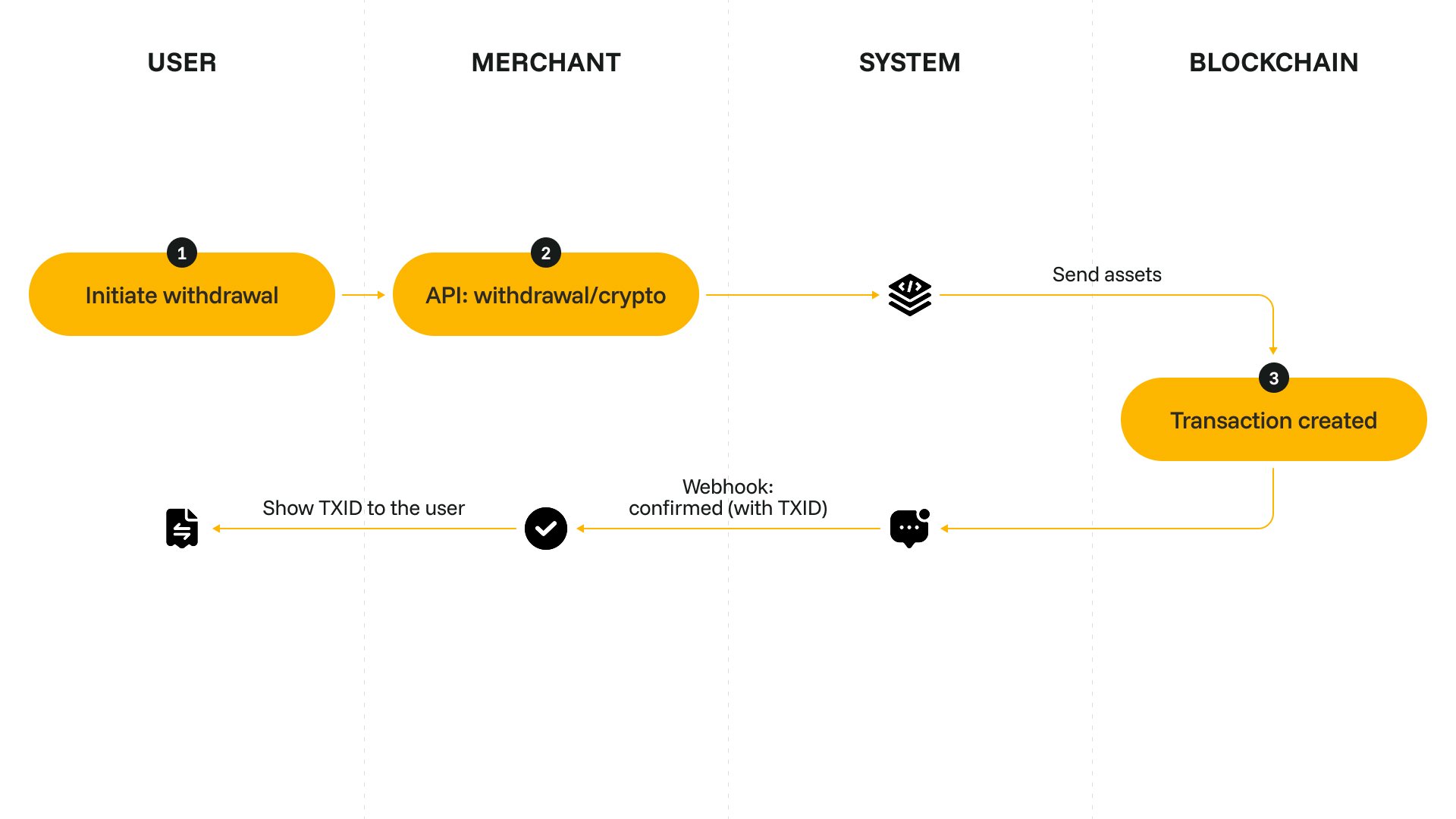 ## Set up withdrawals
Complete your onboarding in your merchant dashboard and generate an API key. For more details on how to create an API key, see [Get your API key](/merchant-administration/generate-and-activate-api-keys).
Add a withdrawal form to your site. For our recommendations on how to design the form, see [Design a withdrawal form](/withdrawals/design-withdrawal-form).
Send a request to [/api/v2/withdrawal/crypto](/api-reference/endpoints/withdrawal-crypto). To request a withdrawal with exchange, include the `convert_to` parameter.
You will also need to include `foreign_id` — the unique ID of the withdrawal request. You can use any format you prefer.
```json title="Request example" theme={null}
{
"amount": "100",
"currency": "EUR",
"convert_to": "BTC",
"address": "tb1qfdxh6gkfr0qgyatnlkd8khcnxph9tw06n6qwjc",
"foreign_id": "withdrawal_123"
}
```
```json title="Response example" theme={null}
{
"data": {
"id": 134702831,
"foreign_id": "withdrawal_123",
"type": "withdrawal_exchange",
"status": "processing",
"amount": "100.00000000",
"sender_amount": "100.00000000",
"sender_currency": "EUR",
"receiver_currency": "BTC"
}
}
```
Once the withdrawal is processed, AlphaPo will send you a [callback](/api-reference/callbacks/withdrawal-callbacks).
## Set up withdrawals
Complete your onboarding in your merchant dashboard and generate an API key. For more details on how to create an API key, see [Get your API key](/merchant-administration/generate-and-activate-api-keys).
Add a withdrawal form to your site. For our recommendations on how to design the form, see [Design a withdrawal form](/withdrawals/design-withdrawal-form).
Send a request to [/api/v2/withdrawal/crypto](/api-reference/endpoints/withdrawal-crypto). To request a withdrawal with exchange, include the `convert_to` parameter.
You will also need to include `foreign_id` — the unique ID of the withdrawal request. You can use any format you prefer.
```json title="Request example" theme={null}
{
"amount": "100",
"currency": "EUR",
"convert_to": "BTC",
"address": "tb1qfdxh6gkfr0qgyatnlkd8khcnxph9tw06n6qwjc",
"foreign_id": "withdrawal_123"
}
```
```json title="Response example" theme={null}
{
"data": {
"id": 134702831,
"foreign_id": "withdrawal_123",
"type": "withdrawal_exchange",
"status": "processing",
"amount": "100.00000000",
"sender_amount": "100.00000000",
"sender_currency": "EUR",
"receiver_currency": "BTC"
}
}
```
Once the withdrawal is processed, AlphaPo will send you a [callback](/api-reference/callbacks/withdrawal-callbacks).